
Splitfun
Forward Silver LimitedFinance
3.86.00 Reviews
- Version
- 0.1.10
- Installs
- 50.00K
- Age Rating
- Everyone
Screenshots
Our Review of Splitfun
 Analysis by Appyee
When several people share the same home, the difficult part of splitting expenses is rarely the arithmetic. It is remembering who paid for what, deciding which purchases belong to everyone, and bringing up unsettled amounts without making the conversation awkward. I tried Splitfun with that kind of everyday problem in mind, and I found a finance app that is most useful when a group wants one visible place for shared costs rather than a trail of messages, notes, and mental calculations.
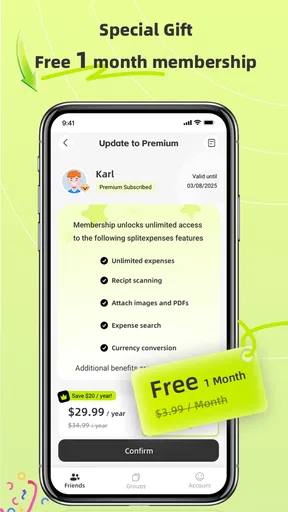
The app comes from Forward Silver Limited and is free to install, with optional in-app purchases ranging from $3.99 to $34.99 per item. It is listed for Everyone, runs on Android starting with version 7.0, and its current version is 0.1.10. Those details make it approachable for a mixed household, although the important question is not whether everyone can open it. The real question is whether everyone will agree on how to record expenses and settle them.
My overall impression is cautiously positive. Splitfun has a clear purpose: make shared spending easier to track and divide. That focus is helpful because it avoids turning a simple household task into a full budgeting project. At the same time, a focused bill-splitting tool is not automatically the best choice for people who need bank synchronization, detailed personal budgets, or formal accounting records. Its value depends on how consistently the group uses it.
How Splitfun fits a real shared household
I find Splitfun most useful when a household treats shared costs as a small, agreed-upon system rather than a record of everyone’s spending. In this section, I’d focus on making the first use feel manageable: choose one shared category, agree how it will be divided, and start with a purchase everyone recognizes. That gives the group a practical way to judge whether the routine is helping before it becomes part of everyday life.
A practical scenario: groceries, utilities, and the forgotten receipt
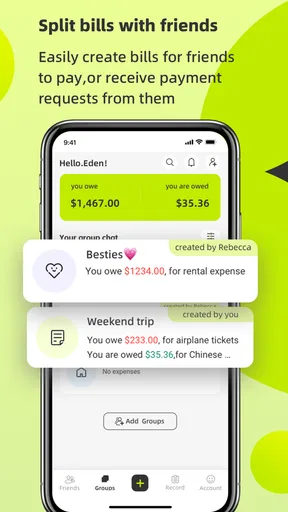
Imagine three people sharing a home. One person buys groceries, another pays the internet bill, and a third covers cleaning supplies. At the end of the week, everyone remembers part of the story, but nobody has a complete picture. One person may say, “I paid for the supermarket run,” while another remembers paying for a household item during the same trip. Without a shared record, the final calculation becomes a negotiation based on incomplete memory.
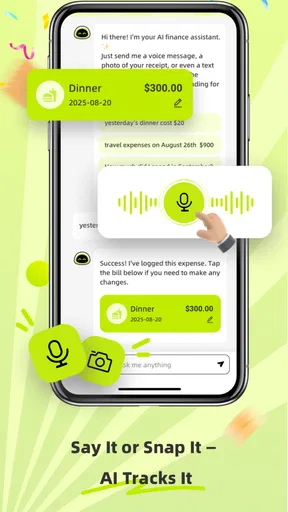
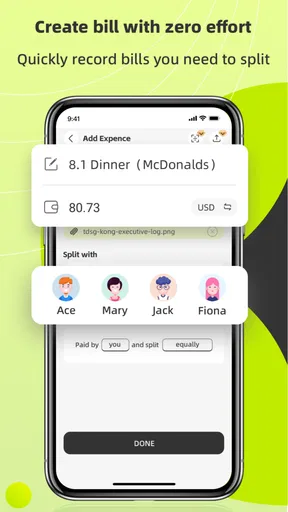
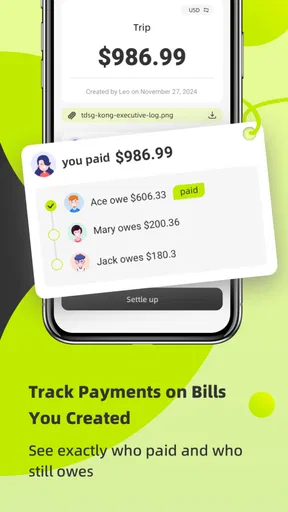
This is where I see the strongest use for Splitfun. Instead of waiting until the end of the month, the person who pays can record the expense while the receipt is still in hand. The group can then use the record as a running reference. That small change matters: it separates the moment of payment from the later conversation about reimbursement.
I would use it for recurring shared needs such as food, household supplies, utilities, transport bought for everyone, and group purchases for a short trip. I would not treat it as a replacement for a personal finance app. A bill-splitting record tells the group how to divide a cost; it does not, by itself, explain whether each person can afford the total amount or whether the household is overspending.
A useful habit is to agree on the rule before entering the first expense. Is a grocery purchase divided equally? Does one person pay a larger share because they use more of a service? Are personal items removed from a shared receipt? The app can help organize the result, but it cannot resolve an argument about fairness. The best results come from using Splitfun as a shared agreement log, not as an automatic judge.
Why recording expenses immediately changes the experience
The most overlooked advantage of a tool like this is timing. If entries are postponed, the group has to reconstruct events from banking notifications, receipts, and memory. That creates friction even when the amounts are small. I recommend entering a cost immediately after payment and adding a short description that will still make sense later, such as “weekly groceries” or “shared repair supplies.”
This workflow also exposes a trade-off. The person who paid carries the responsibility of recording the expense accurately. If that person forgets, the app cannot magically recover the missing information. For a household where nobody wants to take that role, a shared spreadsheet may be just as effective, especially if everyone already checks it regularly.
Another practical tip is to avoid combining unrelated purchases in one entry. A receipt containing household food and a personal item may look convenient as one total, but it makes later discussion harder. Separating the shared portion from the personal portion creates a cleaner record and reduces the chance that someone pays for something they did not agree to share.
Shared devices and the boundary between convenience and privacy
The household angle becomes more complicated when people use the same tablet or phone. A shared device can make quick entry convenient, especially in a kitchen or common room, but it also changes expectations about visibility. Anyone opening the app may see information that was intended for the group, including spending descriptions or unsettled amounts.
I would establish a simple device rule before relying on it: shared household records can be entered on the common device, while personal financial details stay in the person’s own protected apps. Splitfun is suitable for coordinating a shared expense, but I would not use a communal phone as a place to manage private banking information or unrelated purchases.
There is also a social boundary. If one person always controls the shared device, that person can unintentionally become the gatekeeper of the household record. A healthier arrangement is for each participant to know how expenses are being recorded and to have a chance to review them. If the group cannot see or discuss the record easily, the app loses much of its advantage.
Setting up expectations before the first settlement
Getting started should be less about filling in every possible detail and more about defining the group. I would first decide who belongs in the shared expense circle, what counts as communal, and how often the balance will be reviewed. A household might check weekly, while a group on a short trip might settle at the end of each day.
This setup boundary is important because “shared” is not the same for every group. Roommates may share rent-related costs but keep food separate. Partners may combine most household expenses while maintaining individual purchases. Friends traveling together may split accommodation evenly but divide meals according to what each person ordered. The app is most useful when the category is narrow enough that everyone understands it.
I also recommend agreeing on a minimum amount worth recording. If every tiny purchase becomes a discussion, the tracking process can become more annoying than the original expense. On the other hand, leaving out small recurring costs can create resentment over time. A practical compromise is to record anything that is clearly communal and meaningful to the group, while ignoring trivial personal adjustments that nobody expects to recover.
These decisions are not glamorous, but they are where most shared-expense systems succeed or fail. The app can provide structure; the household still needs a routine. If one participant refuses to enter expenses, disputes every category, or avoids reviewing the balance, no interface will make the arrangement effortless.
Coordination without turning the home into an accounting office
What I like about the concept is that it can keep coordination lightweight. People do not need a long meeting to discuss every purchase. A quick entry creates a reference point, and a regular settlement time prevents the balance from becoming an uncomfortable open-ended obligation.
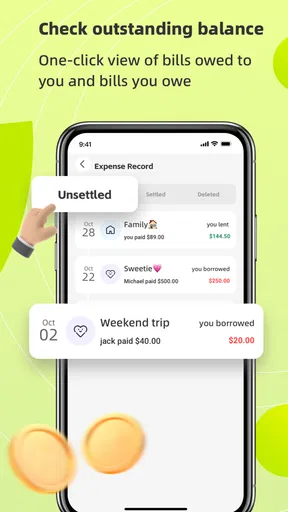
For a household, I would use a short weekly check rather than waiting for a large monthly total. Weekly reviews make mistakes easier to spot because the purchases are still familiar. They also prevent one person from quietly carrying a growing balance. This is one of the more useful habits to pair with Splitfun: the app records the numbers, while the calendar supplies the accountability.
Descriptions should be neutral and specific. “Dinner” is less useful than “Friday takeaway for three,” while “stuff” tells the group almost nothing. Clear wording reduces follow-up questions and makes the record more valuable when someone checks it later. I would avoid using the description field for criticism or jokes that could be misunderstood; a shared expense log works better when it remains factual.
Another non-obvious trade-off is the difference between equal division and actual usage. Equal splits are fast and often appropriate for rent-related household items. They are less fair for a service used heavily by one person or a meal where people ordered very different amounts. Before entering an expense, decide whether the group values speed or precision for that category. Trying to calculate every item exactly can create more tension than it resolves.
What different users should expect from the experience
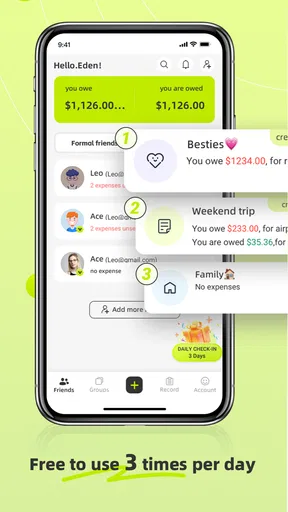
For roommates, the app makes sense when the main problem is keeping a running list of shared purchases. It is especially practical for people who do not want a spreadsheet and do not need a broader financial dashboard. The strongest routine is simple: the payer records the cost, the group checks the running balance, and everyone settles on an agreed schedule.
For couples, the decision is more personal. If both partners already use a joint account, the app may add an unnecessary layer. If they keep finances separate but share selected household costs, it can provide a neutral way to track those obligations. I would be careful, however, not to use an expense list as a substitute for a broader conversation about money. A record can show what happened; it cannot decide what feels fair in the relationship.
For students or young adults sharing a home, the Everyone content rating is reassuring from an access perspective, but age suitability does not remove the need for financial guidance. A younger user should understand what an expense means, who is expected to pay, and why a balance may remain unsettled. The app can support coordination, but a trusted adult may still need to help establish the household rules.
For families using a shared tablet, I would keep the app limited to household costs and avoid treating it as a family-wide view of every person’s spending. That preserves a useful boundary between communal coordination and individual privacy. I would also make sure that children are not expected to make financial commitments simply because they can access the shared record.
Trust, age, and account boundaries
Shared expenses depend on trust more than on software. Each participant needs confidence that entries are accurate, that changes will be discussed, and that the record will not be used to shame someone. This matters even more in a household where people have different incomes. An equal split may look tidy but still be uncomfortable or unrealistic for one member.
I would therefore use the app alongside a clear agreement about corrections. If someone enters the wrong amount or assigns a purchase to the wrong people, the group should fix it openly rather than quietly altering the record and leaving others confused. A visible correction process is more valuable than pretending that the first entry is always perfect.
Account boundaries also matter when several people share a device or one person helps another with setup. I would avoid logging someone else’s personal expenses merely because I am the person holding the phone. The payer should remain identifiable within the group’s own arrangement, and everyone should know which purchases are being included. That keeps the app from becoming a vague household ledger with no clear ownership.
The app’s broad age rating makes it easy to consider for mixed-age households, but I would still match access to responsibility. A child might help identify a shared grocery purchase, while an adult handles decisions about reimbursements. The rating describes who can use the app; it does not define the family’s financial rules.
How it compares with notes, spreadsheets, and broader finance apps
The usual alternative is a notes app. Notes are quick and familiar, and they may be enough for a one-off dinner or a very small group. Their weakness is structure: after several entries, it becomes harder to see who paid, who owes, and which costs belong together. Splitfun is more appealing when the group needs an ongoing shared record rather than a temporary list.
A spreadsheet offers more flexibility. You can create custom columns, formulas, categories, and summaries, which is useful for a complex household or a group that wants complete control. The cost is setup and maintenance. Someone has to design the sheet, protect formulas, and make sure everyone edits the right cells. I would choose a spreadsheet over Splitfun when the group needs detailed reporting or unusual allocation rules.
Broader budgeting apps are better for people who want to monitor income, savings, recurring bills, and personal spending in one place. They can provide a larger financial picture, but that can be unnecessary for a group whose only goal is dividing shared costs. Splitfun’s narrower purpose is its advantage when the household wants less financial administration, not more.
There is also the informal option of asking for payment through a messaging app. That is convenient in the moment, but messages scatter the history across conversations and are easy to overlook. I see Splitfun as a middle ground: more organized than a chat thread, less demanding than a full financial system.
Where the current version feels like a better fit—and where it does not
The app has an average rating of 3.8 from around 55 ratings, with 6 written reviews, and it has passed 50 thousand installs. I read that as a sign of an early, modestly established product rather than a universally proven household standard. Its current version, 0.1.10, also suggests that the experience may still be developing. I would approach it with reasonable expectations and pay attention to whether its workflow matches the group before moving all shared records into it.
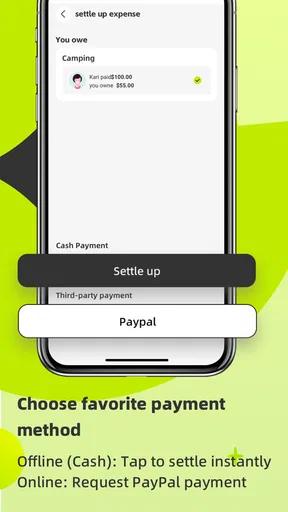
The free entry point lowers the barrier to trying it, but the optional purchases deserve attention in a shared setting. Before a household depends on any paid capability, I would make sure everyone understands who would pay and whether the feature is genuinely needed. A group should not create a financial argument while trying to solve a financial coordination problem.
The main friction is behavioral rather than mathematical. Every participant must remember to contribute accurate entries and review them. The app cannot force a roommate to upload a receipt, persuade a partner that a purchase was communal, or make an unequal split feel fair. If your group wants automatic bank-based tracking, advanced budgeting, or formal records for a business, I would look elsewhere.
I would also skip it for a single, very small transaction. Opening a dedicated expense tool for one coffee among friends may be slower than simply agreeing on payment. Its value grows with repetition: shared homes, recurring group purchases, and trips where several people pay at different times.
My household verdict
After looking at Splitfun through the lens of shared-device use and household coordination, I see it as a practical organizer for groups willing to establish simple rules. It is not a financial adviser, a personal budget, or a replacement for trust. It is a place to make shared spending visible before memory and awkward conversations take over.
I would recommend trying it for a defined purpose: household supplies, a short trip, or a recurring set of communal bills. Start with a small group, agree on the split method, record expenses promptly, and review the balance on a fixed schedule. That approach reveals quickly whether the app actually reduces work for everyone.
My final recommendation is therefore conditional but favorable. Choose Splitfun if your main need is a focused way to coordinate shared expenses and your group is comfortable contributing to the record. Keep using a broader finance tool for personal money management, and choose a spreadsheet when your calculations require custom detail. For the right household, this app can replace scattered notes with a calmer, clearer routine; for a group that will not agree on boundaries or keep entries current, it will only document the confusion.
Verdict
Strengths of Splitfun
- Simple interface makes splitting photos quick and easy.
- Offers creative layouts for combining multiple images.
- Useful for preparing collages for social media posts.
- Previewing results helps avoid unwanted cropping or alignment.
- Lightweight editing tools are easy for beginners to understand.
Limitations of Splitfun
- Some layouts or features may require in-app purchases.
- Export quality can vary depending on the selected layout.
- Limited advanced editing compared with full photo editors.
- Ads may interrupt the editing process in the free version.
- Results may need manual cropping to fit certain social platforms.
Similar Picks in This Category
View All
Google Wallet
Google LLC4.3

Airtel: Recharge, Bank & Loans
Airtel4.0

PayPal - Pay, Send, Save
PayPal Mobile4.2

DANA Indonesia Digital Wallet
PT Espay Debit Indonesia Koe4.5

Binance: Buy Bitcoin & Crypto
Binance Inc.4.8

Cash App
Block, Inc.4.7
Frequently Asked Questions
What is Splitfun and how does it work?
Splitfun is a social entertainment app focused on sharing and enjoying short-form content with other users. After installing it, you can create or browse posts, interact through reactions or comments, and discover content based on your interests. The exact tools available may depend on your device, account type, location, and the version currently offered in the Google Play Store or Apple App Store.
Is Splitfun free to download and use?
Splitfun can generally be downloaded without an upfront charge, but users should review the app-store listing and its in-app purchase information before signing up. Some features, digital items, subscriptions, or premium options may require payment. Check the pricing, renewal terms, and cancellation instructions carefully, especially if the app offers recurring subscriptions or optional upgrades.
Does Splitfun require an account or personal information?
Some Splitfun features may be available immediately, while others can require registration through an email address, phone number, or supported social account. Before creating a profile, review the permissions requested and the privacy policy so you understand how information such as your profile details, activity, uploaded content, and device data may be handled. Avoid sharing sensitive information publicly.
Is Splitfun safe for children and teenagers?
Parents should check Splitfun’s age rating, community guidelines, and privacy controls before allowing a child to use it. Apps with social or user-generated content can expose younger users to public profiles, messages, comments, advertising, or unsuitable material. Use device-level parental controls, restrict purchases, and explain how to block, report, and avoid interacting with suspicious users.
What should I do if Splitfun crashes or does not work correctly?
If Splitfun fails to open, freezes, or cannot load content, first update the application and your device’s operating system, then restart the device and check the internet connection. Clearing temporary data on Android or reinstalling the app may also help, although reinstalling can remove locally stored information. If the problem continues, contact Splitfun support with your device model and app version.
